定制oh my zsh主题

xiaoqinvar / 2025-11-29
4 min read •
Description
定制oh my zsh主题
定制oh my zsh主题
ANSI控制码详细参考:https://juejin.cn/post/6920241597846126599#heading-5 oh my zsh外部主题:https://github.com/unixorn/awesome-zsh-plugins#themes
-
因为我用的时centos云服务器,而oh my zsh有些是针对
Mac终端 + itemr2制作的。 需要导入特殊的字体、特殊的图标,所以我挑选的是没有字体特殊需要的主题 -
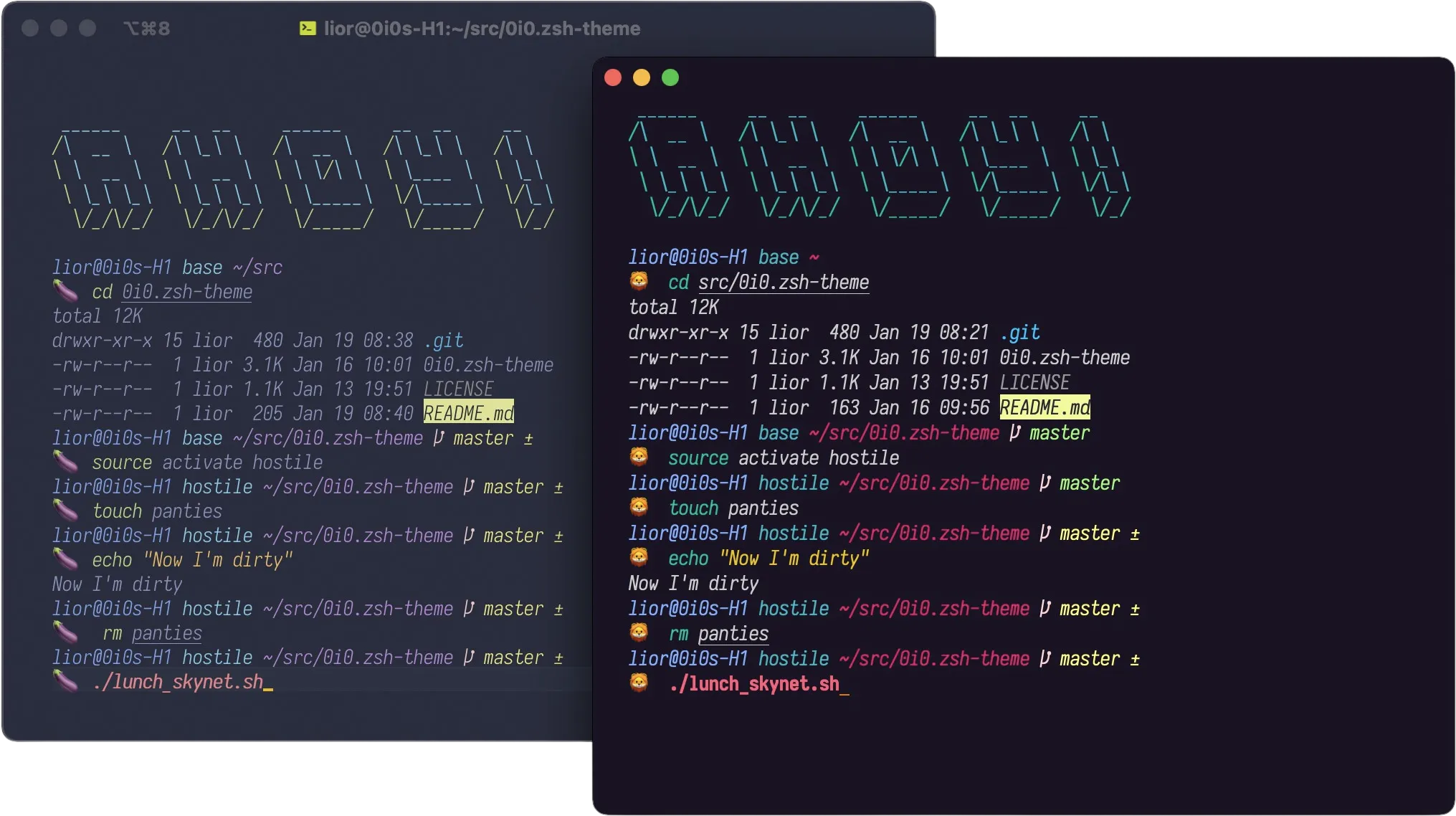
我的主题模板选的是
0i0:https://github.com/0i0/0i0.zsh-theme
适合和我一样喜欢emoji的
-
导入方式:参考
0i0讲解或官方讲解 -
我修改好的模板:
#
CURRENT_BG='NONE'
PRIMARY_FG=black

# Characters
# 用表情代替的都是windows无法识别的表情,可能是Mac特有
SEGMENT_SEPARATOR="🚀"

PLUSMINUS="🐸"

# 分支
BRANCH="🔋"

# → emoji代表撤销
DETACHED="\u27a6"

# × emoji
CROSS="\u2718"

# 前缀
LIGHTNING="🚀\033[38;2;103;180;84mXiao\033[38;2;216;107;112mQin\033[38;5;202mVar's\033[38;2;118;247;233mPersonal \033[38;2;255,192,203mTheme\033[0m🐸🚀"

# 齿轮emoji
GEAR="\u2699"

# Begin a segment
# Takes two arguments, background and foreground. Both can be omitted,
# rendering default background/foreground.
prompt_segment() {
  local bg fg
  [[ -n $1 ]] && bg="%K{$1}" || bg="%k"
  [[ -n $2 ]] && fg="%F{$2}" || fg="%f"
  if [[ $CURRENT_BG != 'NONE' && $1 != $CURRENT_BG ]]; then
    print -n "%{$bg%F{$CURRENT_BG}%}%{$fg%}"
  else
    print -n "%{$bg%}%{$fg%}"
  fi
  CURRENT_BG=$1
  [[ -n $3 ]] && print -n $3
}

### Prompt components
# Each component will draw itself, and hide itself if no information needs to be shown

# Context: user@hostname (who am I and where am I)
prompt_context() {
  local user=`whoami`

  if [[ "$user" != "$DEFAULT_USER" || -n "$SSH_CONNECTION" ]]; then
    prompt_segment CURRENT_BG 111 "%(!.%{%F{yellow}%}.)$user@%m "
  fi
}

# Virtualenv: current working virtualenv
prompt_virtualenv() {
  local virtualenv_path="$CONDA_DEFAULT_ENV"
  if [[ -n $virtualenv_path ]]; then
    prompt_segment CURRENT_BG 6 "$(basename $virtualenv_path) "
  fi
}

# Dir: current working directory
prompt_dir() {
  prompt_segment CURRENT_BG 5 '%~ '
}

# Git: branch/detached head, dirty status
prompt_git() {
  local color ref
  is_dirty() {
    test -n "$(git status --porcelain --ignore-submodules)"
  }
  ref="$vcs_info_msg_0_"
  if [[ -n "$ref" ]]; then
    if is_dirty; then
      color=228
      ref="${ref} $PLUSMINUS"
    else
      color=156
      ref="${ref}"
    fi
    if [[ "${ref/.../}" == "$ref" ]]; then
      b="$BRANCH"
    else
      b="$DETACHED"
    fi
    prompt_segment CURRENT_BG 224 "$b "
    prompt_segment CURRENT_BG $color "$ref "
  fi
}

# Status:
# - was there an error
# - am I root
# - are there background jobs?
prompt_status() {
  local symbols
  symbols=()
  [[ $RETVAL -ne 0 ]] && symbols+="%{%F{red}%}$CROSS"
  [[ $UID -eq 0 ]] && symbols+="%{%F{yellow}%}$LIGHTNING"
  [[ $(jobs -l | wc -l) -gt 0 ]] && symbols+="%{%F{cyan}%}$GEAR"

  [[ -n "$symbols" ]] && prompt_segment CURRENT_BG default "$symbols "
}

prompt_caret(){
  EMOJIS=( 🚀  🐸 😈 💩 👻 💀 👅 🤷 🦊 🍼 🦁 🙈 🙉 🙊 🐒 🍑 🍆 💊 💣 💔 🐡 🚬 👑 🫀 🧠 )
  SELECTED_EMOJI=${EMOJIS[$RANDOM % ${#EMOJIS[@]}]}
  NEWLINE=$'\n'
  print -n "${NEWLINE}${SELECTED_EMOJI}  "
}

# End the prompt, closing any open segments
prompt_end() {
  print -n "%{%k%}"
  print -n "%{%f%}"
  CURRENT_BG=''

}

## Main prompt
prompt_agnoster_main() {
  RETVAL=$?
  CURRENT_BG='NONE'
  prompt_status
  prompt_context
  prompt_virtualenv
  prompt_dir
  prompt_git
  prompt_caret
  prompt_end
}

prompt_agnoster_precmd() {
  vcs_info
  PROMPT='%{%f%b%k%}$(prompt_agnoster_main)'
}

prompt_agnoster_setup() {
  autoload -Uz add-zsh-hook
  autoload -Uz vcs_info

  prompt_opts=(cr subst percent)

  add-zsh-hook precmd prompt_agnoster_precmd

  zstyle ':vcs_info:*' enable git
  zstyle ':vcs_info:*' check-for-changes false
  zstyle ':vcs_info:git*' formats '%b'
  zstyle ':vcs_info:git*' actionformats '%b (%a)'
}

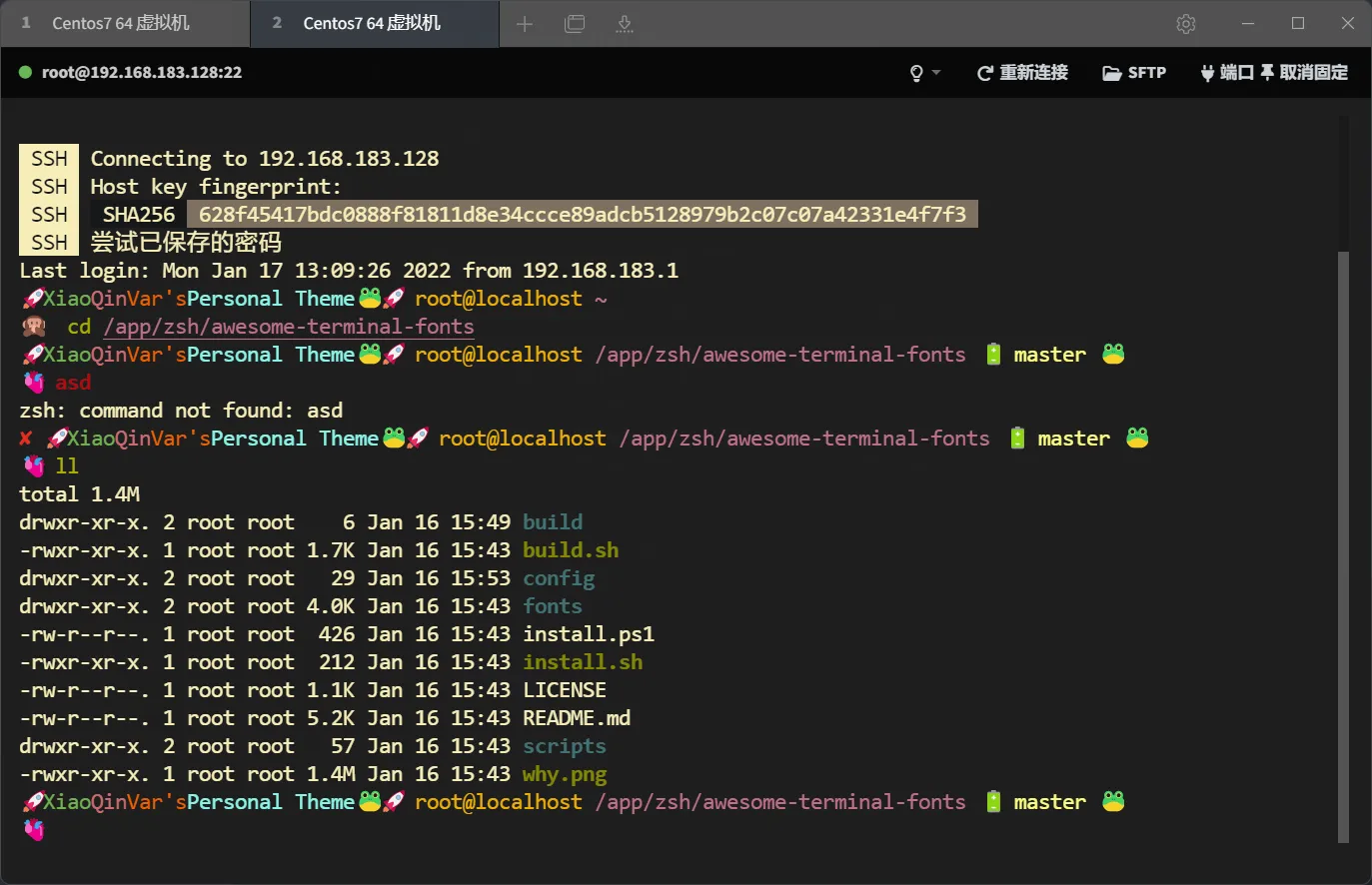
prompt_agnoster_setup "$@"- 展示效果:
推荐使用
Tabby终端,只有它才能展示emoji,它的功能也有终端 + SFTP文件上传下载 + 用Vs code编辑等 FinalShell和MobaXterm无法展示emoji,适合不用emoji的主题
用
Tabby的主要原因是它是大前端的产物开发的语言是TypeScript,虽然说MobaXterm is so awesome,对我这种大前端出生的全栈玩家来说,大致功能差不多情况下颜值第一,现代化美观软件才是第一生产力